
Loading...

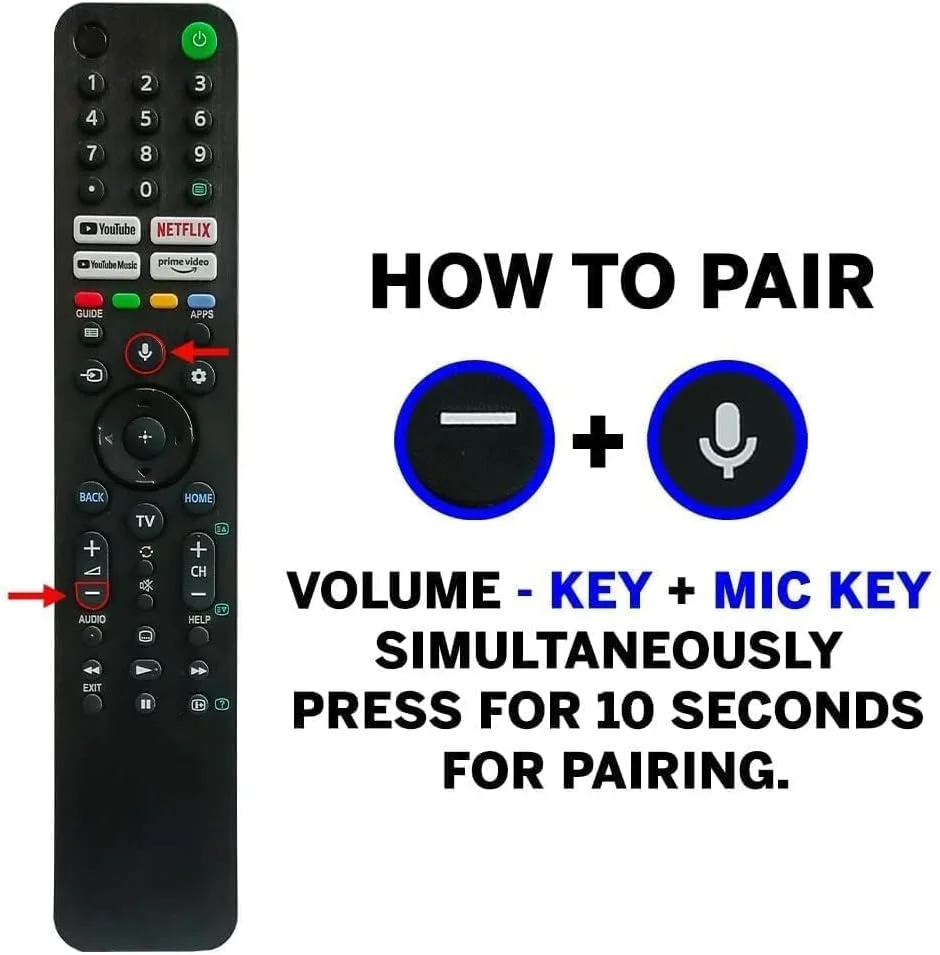
The Bluetooth Voice Command Remote Control compatible with Sony Bravia RMF-TX520P is designed to restore complete smart control to your Sony Bravia 4K Google TV. Built for seamless Bluetooth connectivity, this premium replacement remote supports voice search, quick app access and smooth navigation across supported Sony Bravia television models including A80J, X80J, X85J, X90J and X95J series.
Whether your original remote is lost, damaged or not responding, this RMF-TX520P compatible remote delivers the same essential functionality required to operate your Sony Bravia Smart TV efficiently. With voice command support and pre-mapped shortcut keys, everyday TV usage becomes faster, simpler and more intuitive.
This remote control is ideal for:
Sony Bravia TV owners needing a replacement or spare remote
Users of Google TV or Android TV who rely on voice search
Households with multiple rooms using Sony Bravia televisions
Customers looking for a cost-effective alternative to an original remote
Senior citizens who prefer easy navigation and voice control
The RMF-TX520P compatible remote enhances your viewing experience by combining Bluetooth technology with voice command support. Unlike infrared-only remotes, Bluetooth pairing allows reliable control without direct line-of-sight to the television.
Voice command functionality helps you search content, change settings and launch apps quickly using your voice. Dedicated app shortcut buttons reduce the need for manual navigation, saving time and effort during everyday use.
Included AAA batteries ensure the remote is ready for immediate use once paired with your TV.
Bluetooth voice command remote compatible with Sony Bravia TVs
Supports Google TV and Android TV interface
Voice search functionality for content and settings
Dedicated shortcut buttons for popular streaming apps
Ergonomic layout for comfortable one-hand operation
Responsive buttons for accurate command execution
Strong Bluetooth signal for stable connection
Includes 2 AAA batteries for instant setup
This remote control is compatible with Sony Bravia television models that support Bluetooth voice remotes, including but not limited to:
Sony Bravia A80J series
Sony Bravia X80J series
Sony Bravia X85J series
Sony Bravia X90J series
Sony Bravia X95J series
Compatibility depends on the TV supporting Bluetooth voice remote pairing. Infrared-only models are not supported.
Insert the supplied AAA batteries into the remote.
Switch on your Sony Bravia TV manually using the power button.
Hold the Back and Home buttons together on the remote for a few seconds.
Follow the on-screen instructions to complete Bluetooth pairing.
Once paired, test voice command and navigation keys.
Pairing is required only once unless the remote is reset or paired with another TV.
The built-in microphone allows you to use voice commands to:
Search movies, shows and apps
Open installed streaming platforms
Control playback functions
Navigate Google TV menus
Adjust supported settings
Voice command performance depends on the TV software version and internet connectivity.
Use only AAA batteries of good quality
Remove batteries if the remote is not used for long periods
Avoid exposure to moisture or direct sunlight
Clean with a soft dry cloth
Do not drop or apply excessive force
Proper care ensures long-lasting performance and reliable operation.
When purchasing a Sony Bravia replacement remote, always check:
Model compatibility with your TV series
Bluetooth and voice command support
Button layout matching your usage needs
Battery type and availability
This RMF-TX520P compatible remote is a practical choice for users who want essential smart TV features without paying premium prices.
Competitive pricing for TV accessories
Quality-checked products
Reliable customer support
Easy ordering and secure checkout
Suitable replacement solutions for popular TV models
